Getting Started
A walkthrough from pip install to your first plotted spectrum and NIRCam cutout. Running example throughout is the object RUBIES-EGS-49140 (J141934.14+525238.7), a bright Little Red Dot at z=6.69 with public data from RUBIES, CAPERS, EGS-BUBBLES, OCEANS, C3PO, and THRILS.
If you'd rather click "run all" and read the output, the same flow lives in python/examples/quickstart.ipynb.
1. Install#
You can install the CLI directly from Github:
pip install \
  "campfire-layout @ git+https://github.com/hollisakins/campfire.git#subdirectory=layout" \
  "campfire @ git+https://github.com/hollisakins/campfire.git#subdirectory=python/"
Everything in this guide — spectrum plotting, NIRCam cutouts, calibration, and stacking — works with that base install. The only optional extra is interactive Plotly figures:
pip install \
  "campfire-layout @ git+https://github.com/hollisakins/campfire.git#subdirectory=layout" \
  "campfire[plotting] @ git+https://github.com/hollisakins/campfire.git#subdirectory=python/"
2. Authenticate#
campfire login
This opens your browser for OAuth. Approve the device code, and credentials are saved to ~/.campfire/credentials. Tokens auto-refresh; you don't need to log in again unless you campfire logout.
For headless environments (HPC, CI, remote shells without a browser), generate an API key at /profile/api-keys (keys start with sk_) and paste it in:
campfire login --api-key
The same credentials are used by the CLI, the Python client, and any direct REST calls.
3. Sync the catalog#
The catalog lives in a local SQLite database. Sync it once, then query it instantly. Sync is metadata-only — no FITS files yet.
campfire sync
Or, equivalently, from Python:
from campfire import Campfire

cf = Campfire()
result = cf.sync()
print(f"Synced {result['observations']} observations, "
      f"{result['objects']} objects, "
      f"{result['spectra']} spectra")
Synced 146 observations, 3072 objects, 47340 spectra
Re-running cf.sync() is fast and safe — it updates inspection results, redshifts, tags, and any new spectra. If files have been reprocessed on the server, you'll see a stale-count warning; re-fetch them with cf.download(stale_only=True).
To bulk-download FITS from the shell — rather than lazily on first access (see §7) — use campfire download (alias campfire pull):
campfire download --obs ember_uds_p4 # or --program / --field / --all, plus --grating / --stale / --dry-run
The full flag list lives in the CLI Reference.
4. The mental model#
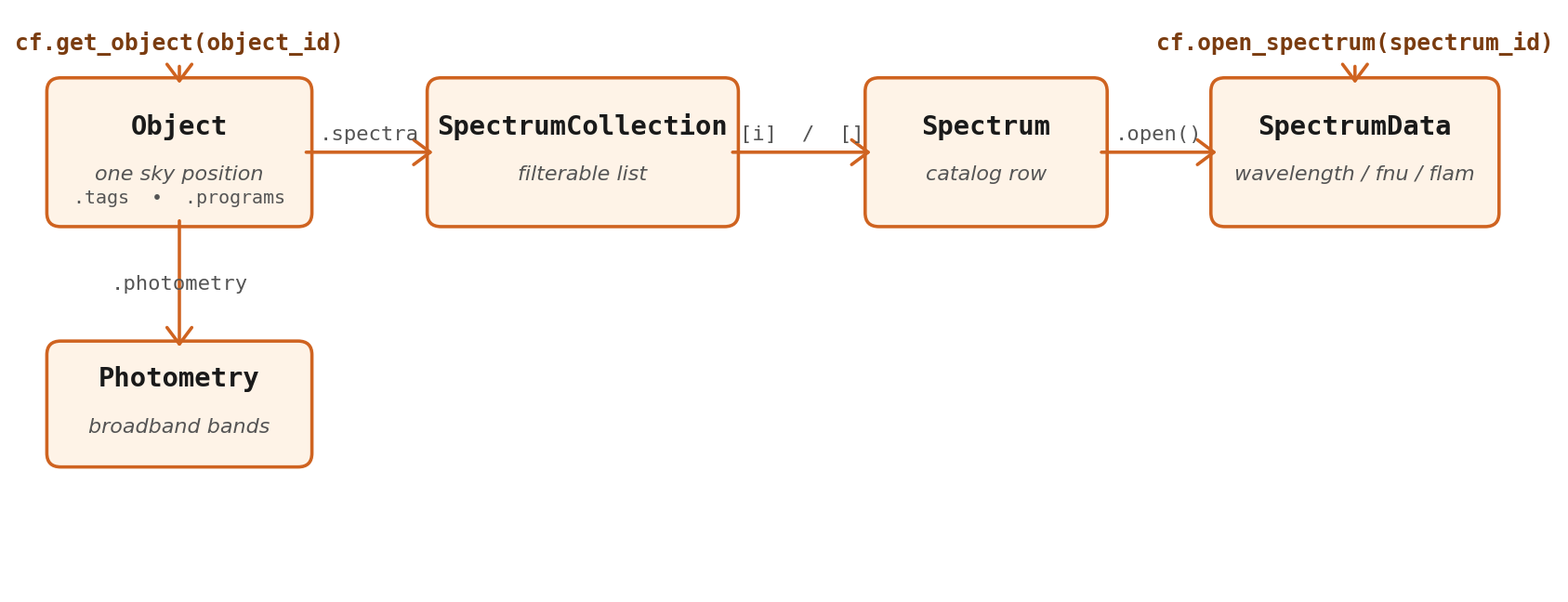
Three things to internalise:
-
query_objectsvsquery_spectra. An object is one sky position (with inspection state — redshift, redshift_quality, tags). A spectrum is one extraction at that position (withspectrum_id,grating, per-spectrum DQ flags). One object usually has multiple spectra across gratings and programs. -
Objectis a typed dataclass with everything attached.cf.get_object(object_id)returns anObjectwhose.spectrais a numpy-style filterableSpectrumCollection, and whose.photometryis aPhotometryinstance (orNone). -
SpectrumDatais the actual numpy arrays.spec.open()(orcf.open_spectrum(spectrum_id)) reads the FITS file from disk if downloaded, otherwise fetches it from the API and caches it locally.
5. Your first query#
query_objects returns one row per sky position as an astropy.table.Table. Filters can be combined freely.
high_z = cf.query_objects(
    redshift_range=(5.0, 12.0),
    redshift_quality=['probable', 'secure'],   # or [3, 4]
    inspected_only=True,
)
print(f"Found {len(high_z)} high-z galaxies")
high_z['object_id', 'field', 'redshift', 'redshift_quality', 'max_snr'][:5]
Found 2366 high-z galaxies

     object_id      field  redshift redshift_quality     max_snr
------------------- ----- --------- ---------------- ----------------
J001348.33-301914.6 a2744 10.206251                4  7.7858099937439
J001348.47-301935.7 a2744  7.425598                4 33.1221122741699
J001349.13-301900.8 a2744  9.526492                4 10.6564788818359
J001352.92-301912.4 a2744  7.973281                4 17.3938312530518
J001401.10-301828.5 a2744  7.907672                4 22.6837329864502
The full filter vocabulary (tags, cone search, DQ flags, programs/fields/gratings/observations, photometry status, search) is in the Python Client reference. For a quick taste:
# Filter by tag
lrds = cf.query_objects(tags=['lrd'], redshift_quality=['secure'])

# Cone search around a coordinate (RA, Dec, radius_arcsec)
nearby = cf.query_objects(cone_search=(214.892, 52.876, 60.0))
6. Pull a single object together#
obj = cf.get_object('J141934.14+525238.7')
print(obj)
Object(J141934.14+525238.7, z=6.6900, egs)
  12 spectra (G140H, G140M, G235H, G395H, G395M, PRISM)
  tags: blagn, hae, lrd, o3e
  Photometry(25 bands, UNICORN EGS v0.98)
obj.spectra is a numpy-style filterable container:
print(obj.spectra)
SpectrumCollection (12 spectra)
spectrum_id                        grating      SNR  exp_time  local
--------------------------------------------------------------------
c3po_p2_g140m_f100lp_46403         G140M       11.3     47268      Y
c3po_p2_g395m_f290lp_46403         G395M      184.6     36764      Y
capers_egs_p3_prism_clear_11585    PRISM      130.0     17069      Y
mason_egs_p3_g140h_f100lp_62859    G140H        4.1     14005      Y
...
prism = obj.spectra[obj.spectra.grating == 'PRISM']     # boolean indexing
hi_snr = obj.spectra[obj.spectra.signal_to_noise > 50]  # numeric comparisons
obj.photometry.bands, obj.photometry.flux, etc. give parallel arrays; obj.photometry['f444w'] returns a single band as a (flux, flux_err, wavelength) tuple.
7. Open and plot a spectrum#
SpectrumData.plot() is a one-line quick-look helper. It steps the spectrum and shades a 1-σ error band by default.
import matplotlib.pyplot as plt

spec = cf.open_spectrum('capers_egs_p3_prism_clear_11585')
print(spec)
# SpectrumData(capers_egs_p3_prism_clear_11585, PRISM, 419 pixels, 0.55-5.37 μm)

fig, ax = plt.subplots(figsize=(10, 4))
spec.plot(ax=ax)
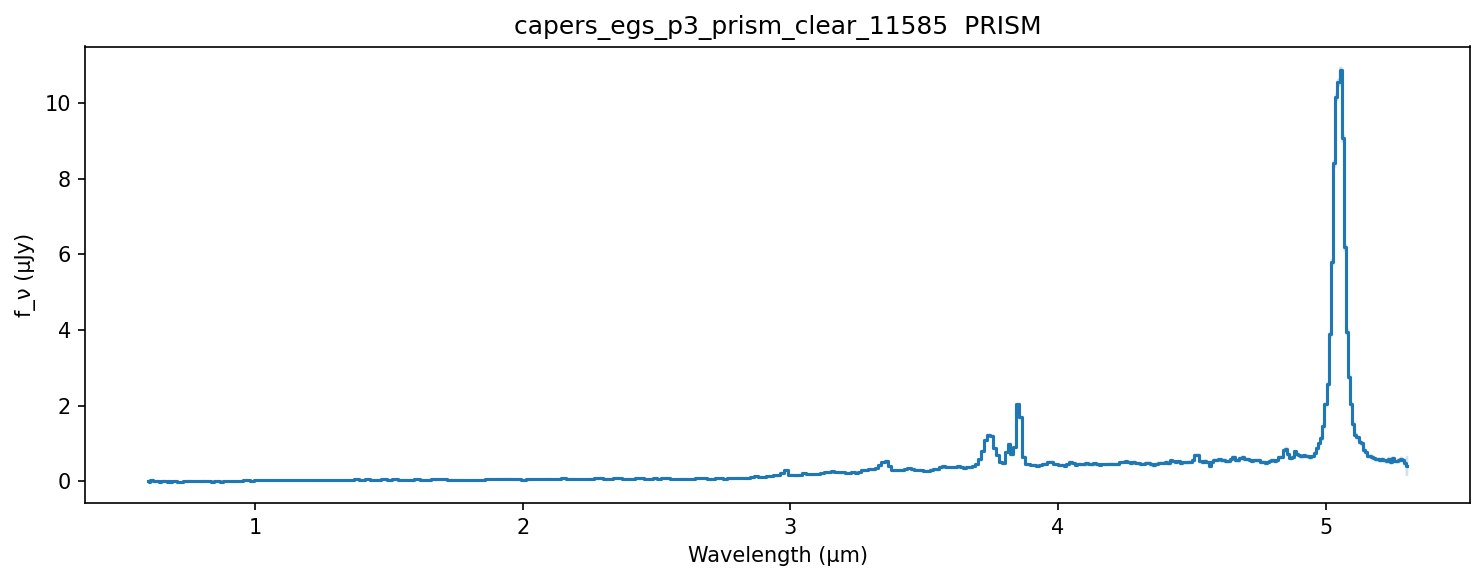
The arrays are also available directly: spec.wavelength (μm), spec.fnu / spec.fnu_err (μJy), spec.flam / spec.flam_err (erg/s/cm²/Å, auto-computed if not in the FITS), spec.header (FITS primary header as a dict).
8. NIRCam cutout#
plot_cutout() produces an RGB image with vector shutter overlays. Both the cutout PNG and shutter geometry are cached locally after the first fetch — subsequent calls are instant.
fig, ax = plt.subplots(figsize=(5, 5))
cf.plot_cutout('J141934.14+525238.7', fov=3.2, ax=ax)
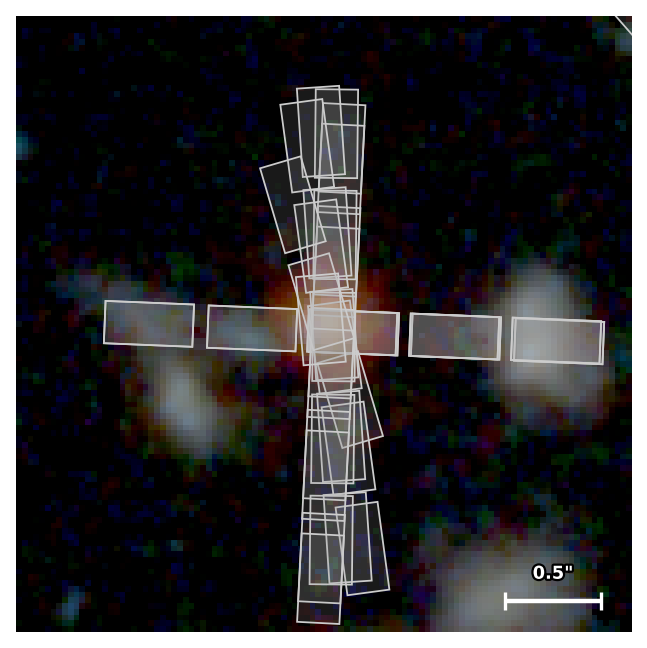
You can restrict shutters to the target only, or use JADES-style L-shaped corner markers. See the cutout recipe for the full styling vocabulary.
9. Local vs remote#
The client transparently uses local data when available and falls back to the API otherwise:
| Operation | If local synced | Otherwise |
|---|---|---|
cf.query_objects() / query_spectra() | SQLite — unlimited, instant | API — capped at 1000, paginated |
cf.iter_objects() / iter_spectra() | SQLite | API auto-pagination |
cf.get_object(id) / cf.get_spectrum(id) | SQLite | API search fallback |
cf.open_spectrum(id) | reads local FITS | downloads + caches FITS |
cf.is_local tells you which mode you're in; cf.last_synced shows the timestamp. Pass remote=True to any query to force the API path even when synced data is available — useful for verifying that your local copy is current.
Where to go next#
- Recipes — six end-to-end task examples: tag-based sample selection, cross-matching, calibration & stacking, large-sample iteration, publication-quality cutouts, SED + spectrum overlay.
- Python Client reference — every method and parameter, organised by topic.
- CLI Reference — the
campfirecommand-line tool, including bulk download options.